| TSP Lab | Sga-SRI4SM-Router – The SRI4SM - Router module | Sga-SRI4SM-Router |
|---|
| Menu | Menuitem | Shortcut(s) | Meaning |
|---|---|---|---|
| [Log] | |||
| Find line containing... | (Ctrl-F) | Finds text in log window | |
| Find next matching line | (F3) | Finds next occurrence of text in log window | |
| Details | Detail level of logging (Off, Normal, Detailed, or Debug) | ||
| [Rules] | |||
| Syntax check | Checks syntax (but does not load) of actions and prefixes (INI/[SCCP/CadPA Rule Actions] and INI/[SCCP/CadPA Rule Prefixes or Values] sections) | ||
| Reload | Reloads actions and prefixes (INI/[SCCP/CadPA Rule Actions] and INI/[SCCP/CadPA Rule Prefixes or Values] sections) | ||
| [Options] | |||
| Auto scroll | (ScrollLock, or   ) )
| Allows automatic scrolling of the log screen | |
| Flush status-line counters | Writes status counters into the log These counters are flushed at every quarter hour automatically. | ||
| Flush & reset status-line counters | Clears status counters after writing them into the log | ||
| Save settings | Saves actual settings into the configuration (Sga-SRI4SM-Router.ini) file |
| Section | Entry | Example | Meaning |
|---|---|---|---|
| [Position] | |||
| iLeft | 140 | Position of the program module on the display screen | |
| iTop | 72 | Position of the program module on the display screen | |
| iWidth | 995 | Position of the program module on the display screen | |
| iHeight | 694 | Position of the program module on the display screen | |
| [Options] | |||
| bAutoScroll | True | (Refer to the [Options]/Auto scroll menu item!) | |
| [SS7 over GyX] | |||
| sRemoteIPAddress | 127.0.0.3 | IP address of GyX_SCTP module | |
| wRemoteTCPPort | 9068 | TCP port of GyX_SCTP | |
| wConnectRetryDelaySec | 3 | Period of attempts to reconnect | |
| [SCCP/CadPA Rule Actions] | This INI section defines rule actions. (See SCCP/CadPA Rule Actions section for details) | ||
| MaxGTdigitsWithPrefix | 13 | Defines the maximum length that an SCCP/CadPA/GT value could reach. Longer values will be truncated to this length. | |
| Default | ChangeTT=99 | Definition of the default action | |
| Rule#NN | ChangeTT=199 | Defined the NN'th action where NN can run from 00 to 99. | |
| [SCCP/CadPA Rule Prefixes or Values] | This INI section defines actions to be applied for SCCP/CadPA prefixes or values. (See SCCP/CadPA Rule Prefixes or Values section for details) | ||
| 3236309304567 | Rule#04 | The action for MAP/MSISDN=3236309304567* is the 04'th rule. | |
| 32485 | Rule#01 | The action for MAP/MSISDN=32485* is the 01'th rule. | |
| [Advanced] | |||
| wLogDetailLevel | 3 | (Equals to the listed order; refer to the [Log]/Details menu item!) | |
| dwMaxLinesInLogWindow | 1000 | Number of lines in the log window on screen | |
| sCDRFilesPath | d:\CDRFiles | Path for the CDR files | |
| sLogFilesPath | d:\LogFiles | Path for the LOG files | |
| sTrapFilesPath | d:\TrapFiles | Path for the SNMP Trap files to be sent | |
| bAlternateTrapUID | True | Allows using fixed UIDs in SNMP traps (See SNMP trap list below for details) |
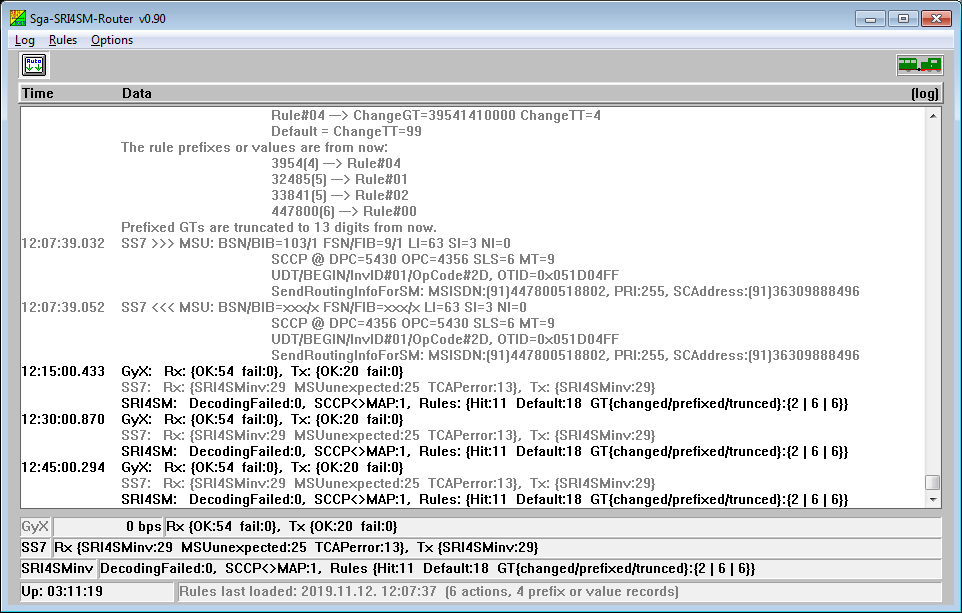
Logging
The Sga-SRI4SM-Router module creates daily logfiles about its working. The name of the logfile is "Sga-SRI4SM-Router_YYYYMMDD.log"
reflecting the day when it is created.
The module can write information into the logfile and onto the screen with several detail levels
set by the [Log]/Details menu item. The logging level can be:
The different colors of log entries have different meanings:
| Code | Color | Usage |
|---|---|---|
| 0 | Black | Compact data record |
| 1 | Red | Errors |
| 2 | Green | Open/close output file/stream |
| 3 | Blue | Open/close input file/stream |
| 4 | Yellow | Warnings |
| 5 | Light Gray | Detailed data (debug info) |
| 6 | Dark Grey | Detailed data (user info) |
| 7 | Purple | Operator intervention; Errors with emphasis |
| UID | Type | Text | Remarks | To Do |
|---|---|---|---|---|
| If bAlternateTrapUID is set to TRUE | ||||
| 9 | CEA | 'Sga-SRI4SM-Router v0.90' module is started. | Send a welcome message; indication of module start-up | |
| 9 | CRI | 'Sga-SRI4SM-Router v0.90' module has been shut down by operator. | Send a farewell warning message; indication of module shut-down | Start the 'Sga-SRI4SM-Router v0.90' module |
| 0 | INF | GyX: Connection to remote module established. | ||
| 99 | CRI | GyX: Connection to remote module is lost. | Check the state of GyX module. | |
| 94 | WAR | Received an unexpected MSU, or its format is unknown. | Badly formatted MSU or the of the arrived MSU is not recognized | Check if the MSU traffic directed to this device is formatted properly |
| If bAlternateTrapUID is set to FALSE | ||||
| 0 | INF | 'Sga-SRI4SM-Router v0.90' module is started. | Send a welcome message; indication of module start-up | |
| 0 | WAR | 'Sga-SRI4SM-Router v0.90' module has been shut down by operator. | Send a farewell warning message; indication of module shut-down | Start the 'Sga-SRI4SM-Router v0.90' module |
| 0 | INF | GyX: Connection to remote module established. | When GyX connection is up first | |
| ++N | CRI | GyX: Connection to remote module is lost. | Check the state of GyX module. | |
| N | CEA | GyX: Connection to remote module established. | When GyX connection is up after a disconnection | |