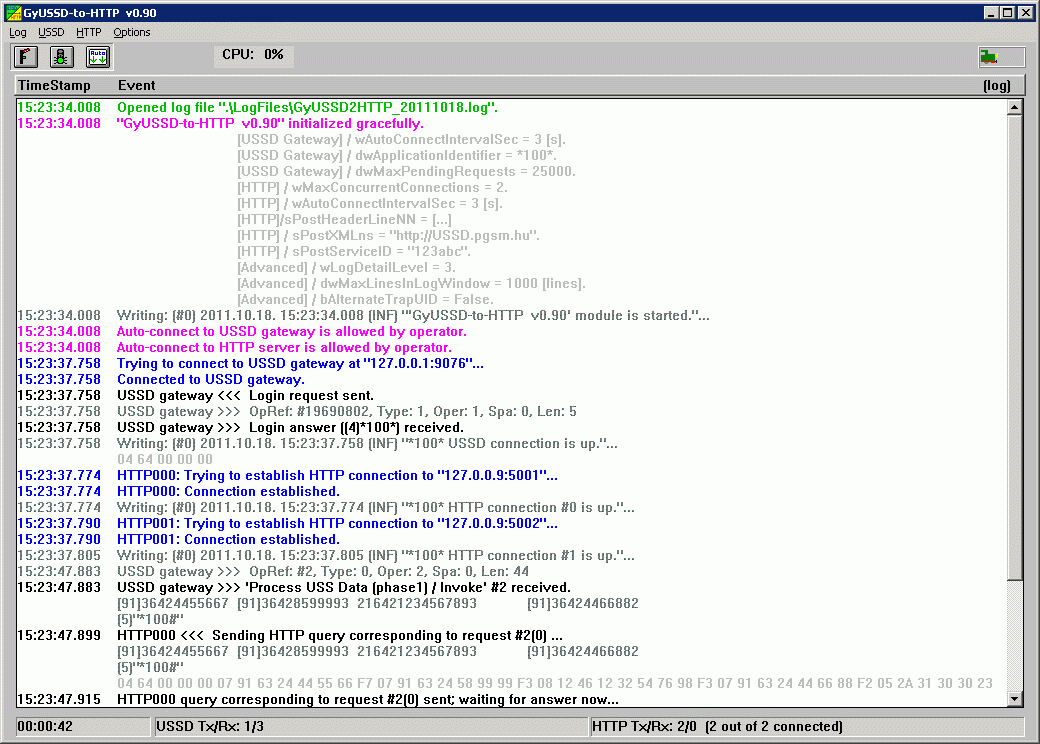
| TSP Lab | GyUSSD2HTTP - The USSD-to-HTTP module | GyUSSD2HTTP |
|---|
| Menu | Menuitem | Shortcut(s) | Meaning |
|---|---|---|---|
| [Log] | |||
| Find line containing... | (Ctrl-F) | Finds text in log window | |
| Find next matching line | (F3) | Finds next occurrence of text in log window | |
| Details | Detail level of logging (Off, Normal, Detailed, or Debug) | ||
| [USSD] | |||
| Allow auto-connect to USSD gateway | (Ctrl-U, or   ) )
| Allows automatic (re-)connecting to the USSD gateway | |
| Forget USSD queue now | Drops all queued requests. | ||
| Terminate connection to USSD gateway now | Connection to USSD gateway will be broken down | ||
| [HTTP] | |||
| Allow auto-connect to HTTP server | (Ctrl-H, or   ) )
| Allows automatic (re-)connecting to the HTTP server | |
| Terminate all HTTP connections gracefully | All connection to HTTP server will be terminate after serving all queued requests | ||
| Abort all HTTP connections immediately | All connection will be aborted without waiting for answers | ||
| [Options] | |||
| Auto scroll | (ScrollLock, or   ) )
| Allows automatic scrolling of the log screen | |
| Show log | (Ctrl-Tab) | Show the log screen | |
| Show USSD queue / HTTP connections | (Ctrl-Tab) | Show the USSD queue and HTTP connections screen | |
| Save settings | Saves actual settings into the configuration (GyEIRx.ini) file |
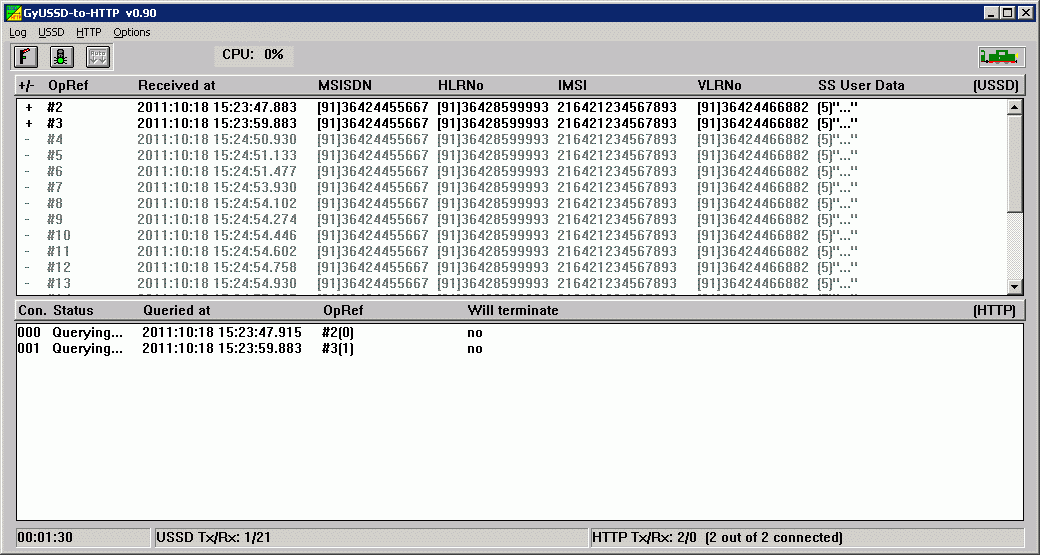
| Menuitem | Shortcut(s) | Meaning | |
|---|---|---|---|
| Simple forget this USSD request now | Queued request will be forgotten |
| Menuitem | Shortcut(s) | Meaning | |
|---|---|---|---|
| Terminate this connection gracefully | This connection to HTTP server will be terminate after serving all queued requests | ||
| Abort this connection immediately | This connection will be aborted without waiting for answers |
Configuration (INI) file settings
| Section | Entry | Example | Meaning |
|---|---|---|---|
| [Position] | |||
| iLeft | 140 | Position of the program module on the display screen | |
| iTop | 72 | Position of the program module on the display screen | |
| iWidth | 995 | Position of the program module on the display screen | |
| iHeight | 694 | Position of the program module on the display screen | |
| [Options] | |||
| bAutoScroll | True | (Refer to the [Options]/Auto scroll menu item!) | |
| [USSD Gateway] | |||
| sIPAddress{1..4} | 10.11.12.13 | IP address of USSD gateway | |
| wTCPPort{1..4} | 9068 | TCP port of USSD gateway | |
| bAllowAutoConnect | True | Allows automatic connection after startup of the program | |
| wAutoConnectIntervalSec | 5 | Period of connection retrials | |
| dwApplicationIdentifier | 180 | Defines which USSD service is served by this module | |
| dwMaxPendingRequests | 20 | Defines how many USSD requests can be stored at the same time | |
| [HTTP] | |||
| sIPAddress{1..2} | 10.11.12.130 | IP address of HTTP server | |
| wTCPPort{1..2} | 9068 | TCP port of HTTP server | |
| bAllowAutoConnect | True | Allows automatic connection after startup of the program | |
| wAutoConnectIntervalSec | 5 | Period of connection retrials | |
| wMaxConcurrentConnections | 20 | Defines how many HTTP connections are established to HTTP servers | |
| sPostHeaderLineNN | POST /USSDService HTTP/1.1 | Header lines of the XML sent to the HTTP server is defined here | |
| sPostXMLns | http://USSD.pgsm.hu | Defines the XML namespace value | |
| sPostServiceID | 123abc | Defines the service ID | |
| sErrorAnswerText | Internal error (HTTP); please retry operation later. Thanks. | Defines the text of answer message | |
| [Advanced] | |||
| wLogDetailLevel | 3 | (Equals to the listed order; refer to the [Log]/Details menu item!) | |
| dwMaxLinesInLogWindow | 1000 | Number of lines in the log window on screen | |
| sLogFilesPath | d:\LogFiles | Path for the LOG files | |
| sTrapFilesPath | d:\TrapFiles | Path for the SNMP Trap files to be sent | |
| bAlternateTrapUID | True | Allows using fixed UIDs in SNMP traps |
Logging
The GyUSSD2HTTP module creates daily logfiles about its working. The name of the logfile is "GyUSSD2HTTP_YYYYMMDD.log"
reflecting the day when it is created.
The module can write information into the logfile and onto the screen with several detail levels
set by the [Log]/Details menu item. The logging level can be:
The different colors of log entries have different meanings:
| Code | Color | Usage |
|---|---|---|
| 0 | Black | Compact data record |
| 1 | Red | Errors |
| 2 | Green | Open/close output file/stream |
| 3 | Blue | Open/close input file/stream |
| 4 | Yellow | Warnings |
| 5 | Light Gray | Detailed data (debug info) |
| 6 | Dark Grey | Detailed data (user info) |
| 7 | Purple | Operator intervention; Errors with emphasis |
.
| UID | Type | Text | Remarks | To Do |
|---|---|---|---|---|
| If bAlternateTrapUID is set to TRUE | ||||
| 9 | CEA | 'GyUSSD-to-HTTP v0.90' module is started. | Send a welcome message; indication of module start-up | |
| 9 | CRI | 'GyUSSD-to-HTTP v0.90' module has been shut down by operator. | Send a farewell warning message; indication of module shut-down | Start the 'GyUSSD-to-HTTP v0.90' module |
| 0 | INF | USSD connection is up. | When USSD gateway connection is up first. [USSD Gateway]/dwApplicationIdentifier is indicated. | |
| 99 | CRI | USSD connection has died | When the connection to the USSD gateway has broken down. [USSD Gateway]/dwApplicationIdentifier is indicated. | Check the state of USSD gateway connection. |
| 99 | CEA | USSD connection has died | When USSD gateway connection is up after a disconnection. [USSD Gateway]/dwApplicationIdentifier is indicated. | |
| 0 | INF | HTTP connection is up. | When HTTP connection is up first. [USSD Gateway]/dwApplicationIdentifier and the order of the HTTP connection are indicated. | |
| 98 | ERR | HTTP connection has died | When one of the HTTP connections has broken down. [USSD Gateway]/dwApplicationIdentifier and the order of the HTTP connection are indicated. | Check the state of HTTP connection. |
| 98 | CRI | HTTP connection has died | When the last HTTP connections has broken down. [USSD Gateway]/dwApplicationIdentifier and the order of the HTTP connection are indicated. | Check the state of HTTP connections. |
| 98 | CEA | USSD connection has died | When a HTTP connection is up after a disconnection. [USSD Gateway]/dwApplicationIdentifier and the order of the HTTP connection are indicated. | |
| If bAlternateTrapUID is set to FALSE | ||||
| 0 | INF | 'GyUSSD-to-HTTP v0.90' module is started. | Send a welcome message; indication of module start-up | |
| 0 | WAR | 'GyUSSD-to-HTTP v0.90' module has been shut down by operator. | Send a farewell warning message; indication of module shut-down | Start the 'GyUSSD-to-HTTP v0.90' module |
| ++N | INF | USSD connection is up. | When USSD gateway connection is up first. [USSD Gateway]/dwApplicationIdentifier is indicated. | |
| ++N | CRI | USSD connection has died | When the connection to the USSD gateway has broken down. [USSD Gateway]/dwApplicationIdentifier is indicated. | Check the state of USSD gateway connection. |
| N | CEA | USSD connection has died | When USSD gateway connection is up after a disconnection. [USSD Gateway]/dwApplicationIdentifier is indicated. | |
| ++N | INF | HTTP connection is up. | When HTTP connection is up first. [USSD Gateway]/dwApplicationIdentifier and the order of the HTTP connection are indicated. | |
| ++N | ERR | HTTP connection has died | When one of the HTTP connections has broken down. [USSD Gateway]/dwApplicationIdentifier and the order of the HTTP connection are indicated. | Check the state of HTTP connection. |
| ++N | CRI | HTTP connection has died | When the last HTTP connections has broken down. [USSD Gateway]/dwApplicationIdentifier and the order of the HTTP connection are indicated. | Check the state of HTTP connections. |
| N | CEA | USSD connection has died | When a HTTP connection is up after a disconnection. [USSD Gateway]/dwApplicationIdentifier and the order of the HTTP connection are indicated. | |